


Microsoft's Automatic Super Resolution (Auto SR) is out of preview on the ROG Xbox Ally X and ROG Xbox Ally X20, and now works in handheld mode, including on battery, Microsoft said in a DirectX blog post on 10 Nov (11 Nov AEST). It's also now available on select Windows Copilot+ PCs with AMD Ryzen chips.
Auto SR is an AI upscaler that runs on the handheld's NPU, the chip's AI processor, rather than the GPU. During the preview it only worked while docked, and games had to run below 1080p. Now it supports games running at 1080p, and when docked it can upscale up to 1440p. Microsoft warns that at 1080p on the built-in screen, performance "may not be as optimal as other configurations", though it says image quality still improves, especially in older games.
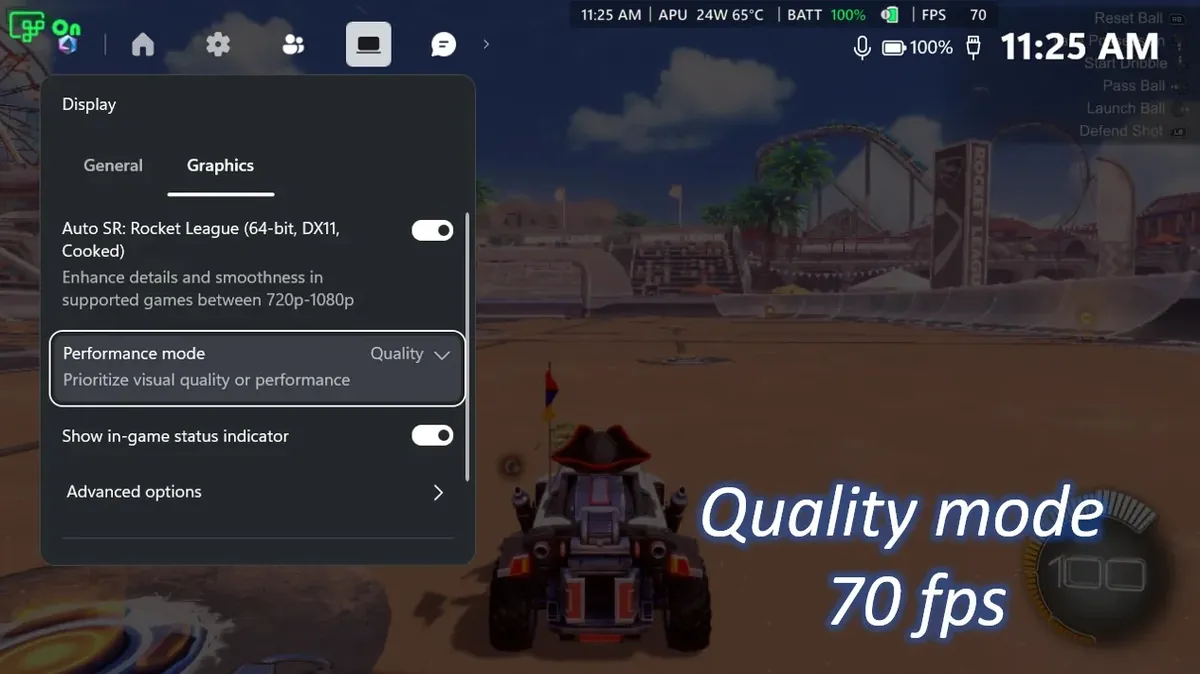
A new Performance Mode raises Auto SR's limit from around 60 to 75fps to up to 120fps, and Auto SR now works alongside Auto HDR. Microsoft says both of those are rolling out through Windows updates and may take a little time to reach your device; handheld play and 1080p support are available now. In Microsoft's own Rocket League test on the Xbox Ally X at 720p, Quality mode averaged 70fps and Performance mode 115fps.
To turn it on, Microsoft says to update Game Bar and Windows, get the Auto Super Resolution package from the Microsoft Store, then open Game Bar with the Xbox button and go to Widgets, Display, Graphics. PC Gamer notes that a game's own FSR is usually still the better pick when it's available and works well, so Auto SR is most useful for games without a built-in upscaler.
Sources: Microsoft DirectX Developer Blog · The Verge · PC Gamer
Read next
Valve says every 512GB reservation is filled. The 2TB model stays scarce, and more supply news is due in January.
Image: Valve
New stories every day by 12pm PT (6am AEST).
More from 12 Nov
- OCESteam age verification in Australia: older accounts can now skip the credit card
- FPSHunger early access and open beta dates from the Hell Let Loose creators
- RPG & ActionZelda: Ocarina of Time remake sales after four days, according to Nintendo
- MMOWoW Forever quest gold: Blizzard adds gold to most quests level 48 and up